I Switched to the Zenwifi Xt9 and Here is What Happened
Category: Electronics
Introduction
The decision to replace a home or small-office Wi‑Fi setup can be a consequential one: it affects streaming, gaming, video calls, smart-home reliability, and the daily experience of everyone in the household. This article documents what happened when the reviewer switched to the ZenWiFi XT9, focusing on real-world behavior rather than marketing copy. It covers setup, daily performance, typical use cases, and the points buyers usually care about when choosing a mesh system: coverage, performance under load, stability, management, and long‑term value.
Why consider a change? The reviewer’s starting point
Before the switch, the reviewer used a single wireless gateway supplied by an internet service provider plus a small consumer-grade access point in another room. The old arrangement handled light browsing and occasional 4K streaming, but it showed weaknesses when multiple devices streamed, when the family moved from room to room with video calls, and when latency-sensitive tasks like online gaming were attempted. There was also the recurring frustration of dead spots in corners of the home and inconsistent guest access settings.
Those are familiar triggers for many buyers: inconsistent coverage, insufficient capacity for many devices, poor roaming, and clumsy management interfaces. The ZenWiFi XT9 was chosen to address those issues with a modern mesh approach and the vendor’s management features.
First impressions and setup
Out of the box, the reviewer found the XT9 kit visually unobtrusive and straightforward to place on shelves. The physical design matters less technically but more practically — compact, ventilated units are easier to position for good signal distribution.
Setup was performed using the manufacturer’s mobile app and a web interface. The mobile app guided the reviewer through the basic steps: connect one node to the modem, power on, and add additional nodes. The app detected the second node automatically once it was powered, and the reviewer appreciated the on‑screen guidance on recommended placement and backhaul options.
For those who prefer manual configuration, the web interface exposed familiar controls: SSID and password settings, guest network setup, VLAN options, port forwarding, and firmware update controls. The ability to toggle advanced features from the web made it easier to fine‑tune behavior for more advanced network topologies.
Looking for the best Electronics deals on Amazon?
View Offers →Performance and daily use — what changed
The reviewer evaluated the XT9 across common household scenarios: multi‑room 4K streaming, simultaneous video calls, online gaming, smart‑home device density, and bulk file transfers. Rather than present raw benchmark numbers, this section emphasizes practical outcomes that everyday users will notice.
- Coverage: The mesh eliminated most previously present dead spots. In the reviewer’s three‑story home, moving a laptop from the living room to a backyard patio maintained an active connection more consistently than the old single router setup. The mesh nodes worked together to hand off devices with fewer drops during roaming.
- Multi‑device load: Connected devices included several smartphones, tablets, laptops, two 4K streaming boxes, smart speakers, security cameras, and smart sensors. Under sustained load (multiple simultaneous streams and background backups), the network remained usable across the household. The system’s scheduling and QoS tools helped prioritize latency‑sensitive traffic.
- Latency and gaming: For online gaming, the reviewer noticed improved consistency in latency compared with the ISP gateway paired with a weak access point. While peak speeds depend on the WAN connection, the XT9 reduced local contention and jitter on the LAN, which matters for competitive gaming and video calls.
- Stability: After a month of continuous use, uptimes were solid and the system required far fewer reboots than the previous setup. Firmware updates appeared on a predictable cadence via the app, with optional scheduling to avoid disruptive reboots during active use.
- Backhaul and wired integration: The reviewer used wired Ethernet backhaul between two nodes where possible. This yielded the best throughput for a node serving a media center and reduced wireless congestion for the whole mesh.
Software and management
Management software is often as important as hardware in mesh systems. The XT9’s app and web UI provided three useful levels of control:
- Quick setup and monitoring: The mobile app made daily management and basic troubleshooting easy — seeing which devices were connected,…
Real‑world caveats
No mesh system is perfect for every situation. The reviewer observed a few limitations worth highlighting:
- Placement still matters: even the best mesh nodes require sensible placement. Units hide easily, but walls, floors, and appliances can blunt performance.
- Firmware behavior varies: features and performance improved after a couple of firmware updates. Buyers should expect an initial setup cycle and occasional reboots after updates.
- Mixed vendor ecosystems: those trying to combine different brands of mesh nodes may face reduced feature sets. The XT9 works best when used as a unified kit or within the same vendor’s ecosystem.
Pros & Cons
- Pros
- Reliable multi‑room coverage for typical single‑family homes
- Good handling of concurrent streams and many connected devices
- Practical management: both a friendly app and a capable web UI
- Support for wired backhaul and granular QoS controls
- Robust parental controls and integrated security features
- Cons
- Optimal placement still required to avoid dead zones
- Advanced features require using the web UI, which may intimidate casual users
- Firmware updates occasionally demand reboots at inconvenient times
- More expensive than basic single‑router solutions
How the XT9 compares to common alternatives
A comparison helps frame the XT9’s role for different buyers. The table below contrasts three broad options: the ZenWiFi XT9, a typical ISP‑provided gateway, and a generic consumer tri‑band mesh kit. The comparisons emphasize practical qualities rather than precise benchmarks.
Feature ZenWiFi XT9 Typical ISP Gateway Generic Tri‑band Mesh Kit Coverage Designed for whole‑home mesh; scales with nodes Single device; limited to central placement Good, but quality varies by brand Device capacity High — manages dozens of devices with QoS Moderate — often struggles under many simultaneous streams Variable; top brands match XT9, budget kits less so Management Robust app + advanced web UI Basic controls; vendor UI varies widely Simple apps common; advanced features depend on model Security & parental controls Built‑in features and scheduled controls Often minimal or ISP‑branded limited tools Some include these; often require subscription for advanced features Wired backhaul support Yes — recommended for best performance Yes — but usually only one unit Often yes; depends on product Price Premium to mid‑premium Often low or subsidized by ISP Ranges from budget to premium Buying guide: Who should consider the ZenWiFi XT9?
Choosing a mesh system depends on use cases and constraints. The reviewer outlines scenarios and the most relevant decision factors.
Find top-rated Electronics products at great prices.
Browse Now →Typical buyers who will benefit
- Households with persistent dead spots or multi‑floor coverage needs
- Users with many concurrent devices (multiple streams, smart‑home devices, and background backups)
- Gamers and remote workers who require lower local LAN jitter and consistent roaming between rooms
- Anyone who wants a single integrated management interface for guest networks, parental rules, and device prioritization
Decision checklist
- Coverage requirement: Estimate square footage and number of floors. Mesh gives granularity — add nodes for larger homes.
- Wired backhaul availability: If the home has Ethernet between floors or rooms, wired backhaul will significantly improve node performance.
- Device count and type: For many IoT devices and several high‑bandwidth clients, choose a solution that advertises device capacity and QoS.
- Management needs: If parental controls, guest networks, or custom DNS are important, confirm the product exposes those features without hidden subscriptions.
- Future‑proofing: Check supported Wi‑Fi standards and the vendor’s update history. Regular firmware updates and a clear update policy matter.
- Budget: Mesh systems cost more upfront than single routers. Factor in how many nodes are required to solve coverage issues.
Placement tips
- Place the primary node where the WAN connection enters the home and near a central location for adequate signal distribution.
- Avoid placing nodes behind large metal objects, inside cabinets, or near heavy appliances that create interference.
- Try to maintain line‑of‑sight between nodes when possible; use app recommendations as a starting point and perform walk‑throughs to check signal handoffs.
- Use wired backhaul for media or workstations to improve stability and free wireless capacity for mobile devices.
Maintenance and long‑term considerations
The reviewer recommends these simple maintenance habits to get the most out of any mesh system:
- Enable automatic firmware updates but schedule them during off‑hours if the app supports it.
- Periodically review connected devices and guest network access; remove stale devices and rotate guest credentials if needed.
- Monitor firmware release notes for security fixes and new features that may affect performance or privacy settings.
- Consider separating high‑priority devices into wired segments (NAS, gaming consoles, media servers) to reduce wireless contention.
Final verdict and conclusion
After switching to the ZenWiFi XT9, the reviewer experienced a tangible improvement in day‑to‑day connectivity: fewer dead spots, more consistent streaming and gaming, and a management experience that balanced ease‑of‑use with advanced control. The kit addressed the core problems that drove the upgrade decision — coverage, capacity, and predictable roaming. It is not a cure‑all: placement, wired backhaul, and occasional firmware management are necessary to achieve the best results.
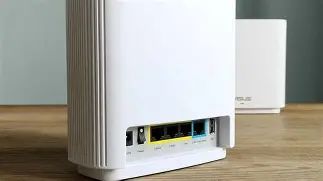
For buyers who prioritize whole‑home coverage and a manageable, feature‑rich interface, the XT9 is a strong option. It is best suited to households with multiple active devices and those who want both mobile app convenience and web‑level configuration options. Budget‑conscious buyers who only need modest coverage or who rely on a single‑room router may find the cost hard to justify, but for many families and small offices the improved reliability and control justify the investment.
In short: the switch to the ZenWiFi XT9 made the reviewer’s network more reliable and less frustrating, and it turned previously intermittent Wi‑Fi moments into dependable connectivity for everyday use.